FAQs

Will my system work with all Tekscan sensors

Question: Will my system work with all Tekscan sensors?

Answer: When you purchase a system, your software allows you to read only the sensors that come standard with that system. You can purchase additional sensor “maps” (drivers) for your software that will allow you to use the system with additional types of sensors. This can be done at the time of the initial purchase, or later on if your application needs change.

Link to this FAQ

Can your sensors be trimmed to a smaller size or shape?

Question: Can your sensors be trimmed to a smaller size or shape?

Answer: Several sensors available are trimmable. Refer to the sensor's detail page to determine whether your sensor is trimmable.

Link to this FAQ

Can I customize a sensor's size and/or pressure range?

Question: Can I customize a sensor's size and/or pressure range?

Answer: Tekscan can custom design and manufacture SINGLE POINT or GRID (ARRAY) sensors in virtually any shape, size, and sensitivity you require. We have created sensing areas as large as 100 Ft2(9.3 m2) and with sensing cell densities as high as 1,600 per in2 (248 per cm2). These custom sensors can be manufactured to interface to your circuits using numerous connection methods.

Link to this FAQ

How many tests/runs do sensors last for?

Question: How many tests/runs do sensors last for?

Answer: The life or durability of our sensors depends greatly on the pressures they are subjected to, as well as the test environment itself. Sensors used to measure lower pressure interfaces and between softer surfaces will last longer than those exposed to higher pressure, in more aggressive environments. Therefore, our sensors may last for only a few tests in some environments compared to thousands of tests in others.

Link to this FAQ

What are the sensors sampling rates?

Question: What are the sensors sampling rates?

Answer: Our sensors are scanned at up to 1,000,000 sensing elements per second. The scan rate for a sensor depends on the number of sensing elements in the sensor and the type of electronic interface you have. Our USB interface allows sampling of up to 100 Hz. Our VersaTek™ interface allows for faster scans at 250 Hz and our high speed interface scans at up to 20,000 Hz.

Link to this FAQ

What is the minimum spatial resolution?

Question: What is the minimum spatial resolution?

Answer: An X-Y dimensional spacing of 0.025”(0.62 mm), other sensors have larger sensing elements, for example 0.67”(17mm). This results in a sensing cell density as high as 1,600 per in2 (248 per cm2).

Link to this FAQ

FlexiPot: Comparison of 3-pin vs 2-pin Termination

Do I need a 3-pin or a 2-pin FlexiPot™?

The standard off-the-shelf FlexiPot™ postition sensor is terminated with a 3-pin connection. You may wish to consider a custom 2-pin termination depending on your application requirements:

3-Pin FlexiPot:

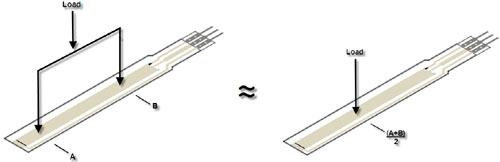
The 3-pin FlexiPot functions similarly to a voltage divider. Power and ground are applied to the outside pins, and the voltage output is measured from the center pin. Also, it is important to note that the voltage output is zero when unloaded which provides the dual functionality of both linear position response and switch-like touch response. If two separate locations are loaded on the 3-pin FlexiPot, the voltage output is approximately equal to the output that is seen when the point directly between those two locations is loaded. This is useful in applications where the center point of the load applicator(s) is the position of interest:

FlexiPot 3-pin design is the standard FlexiPot constructionFlexiPot 3-pin design is the standard FlexiPot construction

2-Pin FlexiPot:

The 2-pin FlexiPot functions similarly to a variable resistor. The resistance output will default to the maximum value, referred to as the native resistance, when unloaded and will decrease proportionally to distance. One simple way to obtain an analog voltage output from the 2-pin FlexiPot is to connect it to a power source in a voltage divider configuration by pairing it with a fixed resistor.

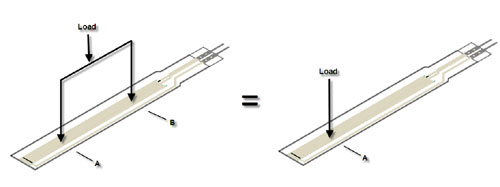
If two separate locations are loaded on the 2-pin FlexiPot, the resistance output is equal to the output that is seen when only one of the locations is loaded (the location that is farther from the pins). This is useful in applications where the same edge of the load applicator is always the position of interest:

FlexiPot 2-pin design is an optional custom constructionFlexiPot 2-pin design is an optional custom construction

Back to positions sensors main page.

Link to this FAQ

Why are the stance phases in the Force/Time curves not starting at 0 kg (0 lbs)? Shouldn't the starting point be 0 kg (0 lbs)?

Question:Why are the stance phases in the Force/Time curves not starting at 0 kg (0 lbs)?  Shouldn't the starting point be 0 kg (0 lbs)?

Answer: When the foot is in contact with the floor or ground, there is pressure (or force greater than 0).

When the foot is not in contact with the floor or ground, there is no pressure (or force = 0). With pressure/force measurement devices, the situation above is not always true. There can be pressure or force on the device (and/or measured by the device) when the foot not on the measurement device. Therefore, the device measures a force when the foot is off the mat; this effect is due to what we refer to as residual pressure or force. The reason for this will not be explained here. If there is residual force, there is therefore no frame or time when there is zero force. In this situation, the software is unable to differentiate between a stance phase (foot in contact and force greater than 0) and a swing phase (foot not in contact and force = 0). To counter this situation, the software needs a method to identify when foot is in contact vs. foot is not in contact. To do this, an algorithm is applied to calculate a force threshold. Below this force threshold, the software considers the forces as residual force, and sets the foot not in contact (not in stance phase). Above this force threshold, the software considers the forces as part of the stance phase, and sets the foot in contact.

This algorithm is applied for all recordings, and is as follows:

Force Threshold = Minimum Force + ( (Maximum Force - Minimum Force) * 10% )

Example (in kg):

Minimum Force = 0 kg (0 lbs)
Maximum Force = 100 kg (220 lbs)

Force Threshold = 0 + ( (100 - 0) * 10% )
= 0 + (100)10%
= 0 + 10
= 10 kg

Note: The same calculation can be performed with lbs as the unit of measurement

The software then uses this threshold to identify and set the start frame and end frame of the stance (foot in contact).

When using the Trigger feature, a force threshold is set to identify when to start-stop a recording. This is, however, different than the process to identify when the foot is considered to be in stance phase and in swing phase. Note that the default Start Method is not with force = 0, but with force having a value greater than 0.

If Start Method is set with force = 1 kg (2.2 lbs), recording will start once 1 kg (2.2 lbs) is applied on the mat. The recording is here started, BUT, to identify/differentiate between stance phase and start of curve in graph (foot considered on mat) and swing phase and end of curve in graph (foot not considered on mat), the threshold algorithm is still used. The curve is set to start at the 1st (initial foot) contact frame. Since these frames do not have a zero value, curve does not start at zero.

Link to this FAQ

My software does not recognize my Evolution Handle. I get the error: No Handles Found

Issue: My software does not recognize my Evolution™ Handle. I get the error: No Handles Found

Solution: First, check the indicator light at the end of the Handle near the cord. If this is not lit, then the Handle is not getting power. If the indicator light is amber in color, rather than green, you will want to uninstall the device driver for the Evolution handle.

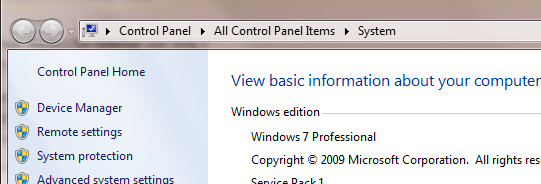
Click the Start button and right-click on Computer. Select: Properties. On the System window, click: Device Manager.

Windows Device Manager

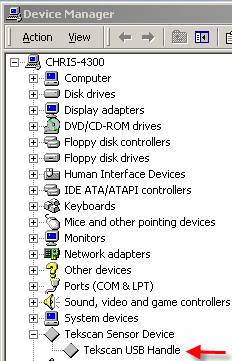
Find Tekscan in the list.

Device Manger

Right-click on the driver for the Evolution Handle.  Select: Uninstall.

Then, unplug the USB cable.  After a brief moment, plug in the USB cable.  Windows should now be able to find and install the driver for the Handle automatically.

If Windows cannot find the driver automatically, insert your Tekscan CD,  exit from the CD's installation program, and then have Windows find the driver in the Drivers folder on the CD.

Always plug the handle into the same USB port on your computer. Otherwise, Windows may force you to reload the device driver.

If the error persists, you should confirm that Evolution is listed as one of the available Handle types in the No Handles Found error message.  Then, reboot the computer.

Link to this FAQ

How to calculate acceleration?

Question: How can I calculate acceleration?

Answer: If you are using MatScan™ or an F-Mat™, you can calculate the distance traveled by the CoF (Center of Force) divided by time squared.

This data can be obtained by exporting the CoF co-ordinates into an ASCII file (with the Research software version). The ASCII data will provide the x,y coordinates for the CoF (Center of Force) and time in spreadsheet format (Excel for example). If you have the Clinical version of our software, you will need to write down the x,y coordinates of the CoF and the times, then do the calculations to obtain distances and time intervals.

Link to this FAQ